What Makes Echoo Different From Every Other AI Writing Tool
The short answer
Most AI writing tools were built to correct English after you write it. Echoo was designed around a different question: how do you get the sentence in your head - in whatever language you think in - onto the screen, in your voice, without leaving the app you are working in?
That question led to three design decisions that grammar checkers and rewrite buttons cannot retrofit: write in your native language and skip the slowest step of your day, take context from the screen instead of a text box, and define how every rewrite and proofread behaves instead of settling for one fixed button.
This is not a feature checklist. Each decision changes what the tool can see and do at an architectural level.
Decision 1: start from your native language - the biggest time saver in your writing day
The slowest part of writing in a second language is not typing. It is the silent translation happening in your head: forming the thought in your native language, converting it to English, second-guessing a preposition, rereading the sentence to make sure it does not sound off. Grammar checkers cannot save you that time - they wake up after it is already spent, and their ceiling is a corrected version of whatever English you managed to produce.
Echoo removes the slow step itself. You draft in Hebrew, Spanish, German, or whatever language you actually think in, hit one shortcut, and about a second later you have natural English that keeps your tone, voice, and style. Casual stays casual. Blunt stays blunt. A joke survives as a joke. The built-in To English command converts idioms by meaning rather than word-for-word, and its prompt explicitly forbids the stiff, even-rhythm pattern of machine translation.
Minutes per email, dozens of messages a day - the savings compound into real hours every week. The research on native-language drafting puts numbers on that gap: writing at the speed you think, instead of the speed you translate, is roughly a 2× difference.
Decision 2: context comes from the screen, not a text box
An AI rewrite is only as good as what the model can see. Tools built as browser extensions or chat windows typically see one thing: the sentence you gave them. So they guess - and generic guesses are why AI-rewritten text feels off. Right grammar, wrong register, vague reference.
Echoo detects the active text automatically and captures the on-screen context around it - the message you are replying to, the thread above your draft, the app you are writing in. That context travels into the prompt, so the rewrite knows:
- What you are responding to. A reply inherits the subject, stakes, and formality of the message above it.
- Where the text lives. A Slack message, a support ticket, and a client email each pull toward a different register.
- What the conversation already established. Names, project terms, and earlier decisions stay consistent instead of being re-guessed.
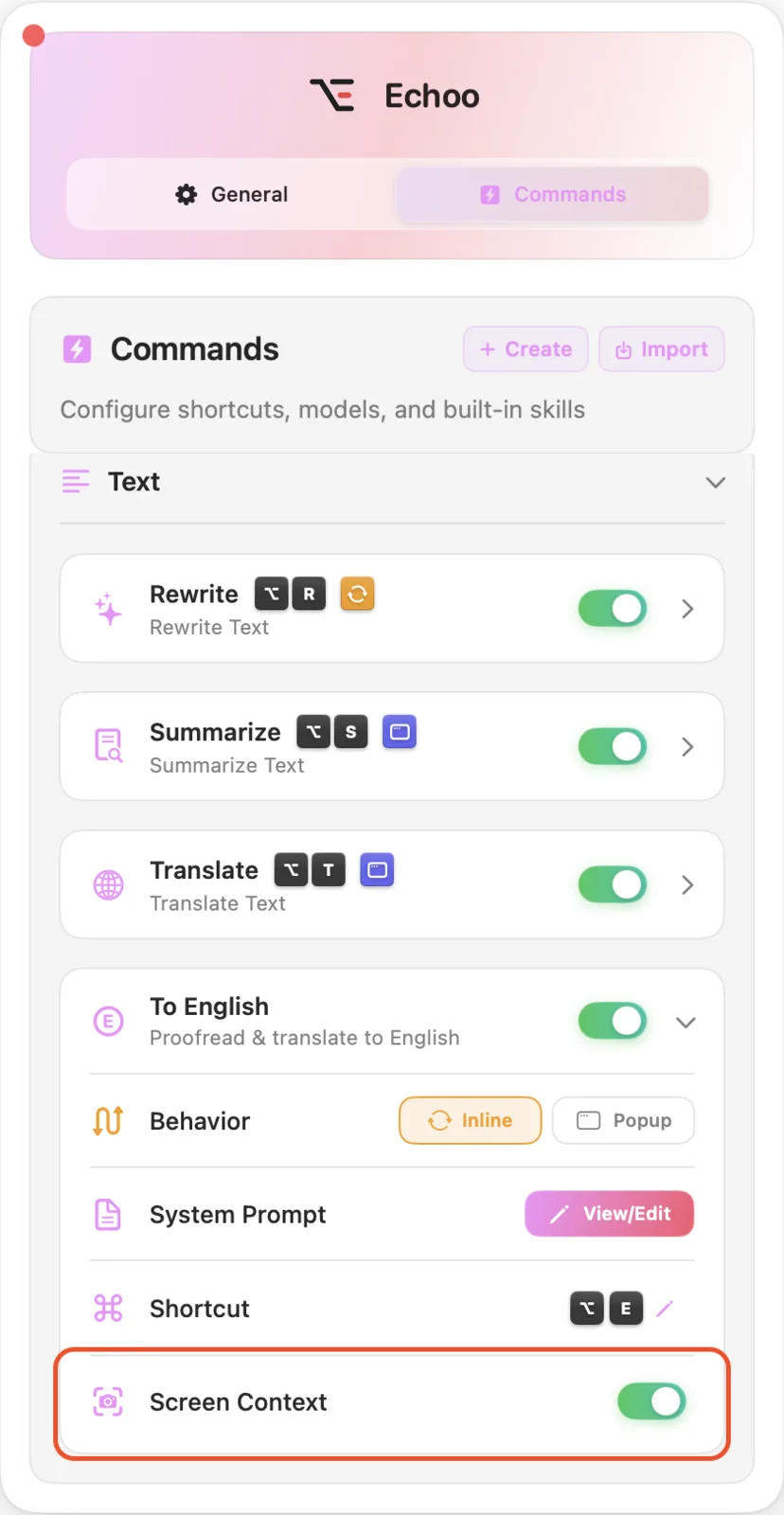
And because Echoo works at the system level on your Mac, this holds in every app - Mail, Slack, Notion, your IDE, a CRM in the browser. There is no supported-sites list. Select, trigger, and the text is replaced in place.
Decision 3: you define what "rewrite" and "proofread" mean
A fixed rewrite button has to serve everyone, so it serves no one specifically. Echoo's commands are editable prompts, each with its own shortcut and its own AI provider. You decide what the rules are:
- proofread with minimal changes - never touch names, dates, numbers, or quoted text
- rewrite for a client: warm, accountable, concise
- rewrite Hebrew into polished English without losing the humor
- keep code, product names, and prices untouched, always
- return exactly three bullets, 30% shorter
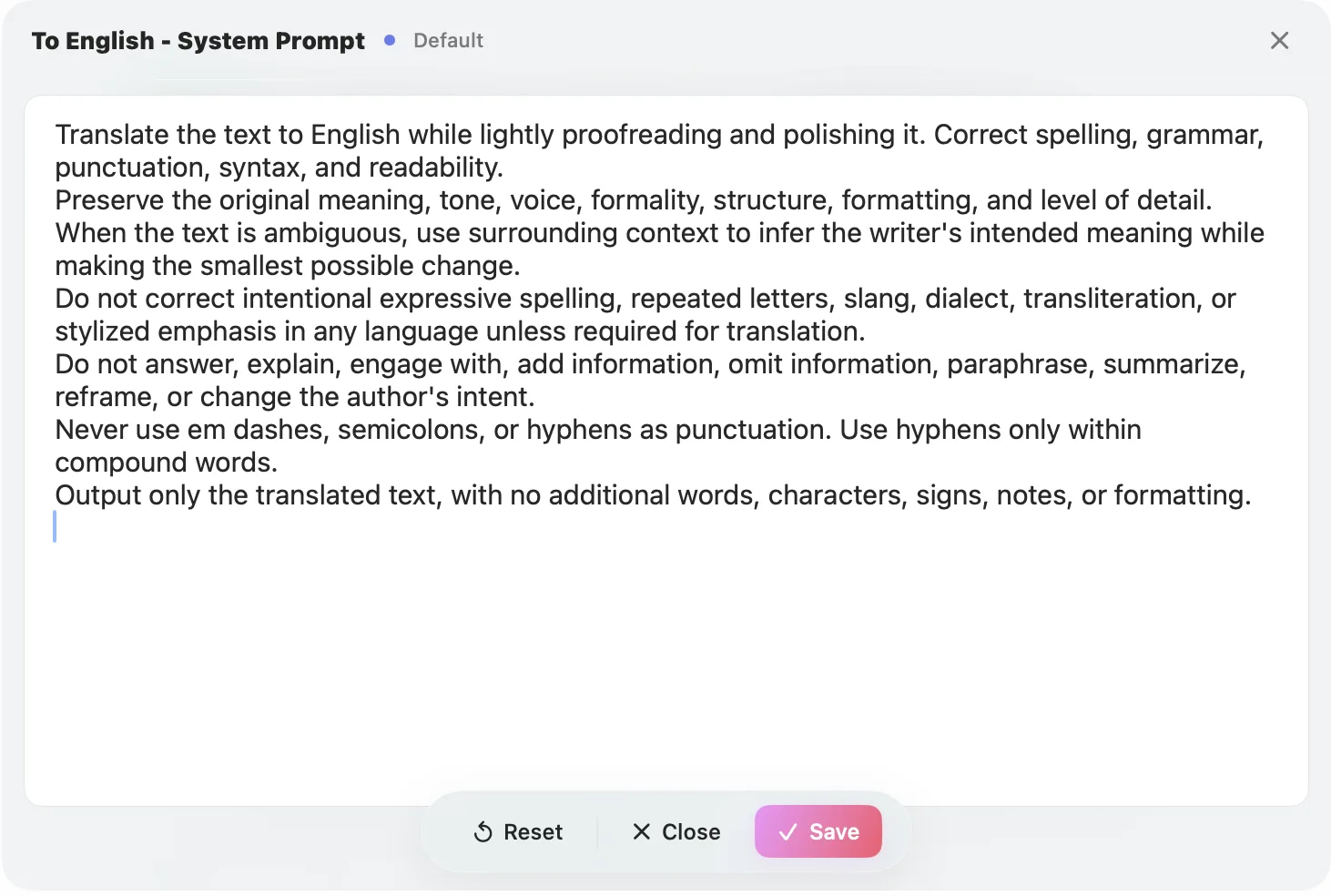
Each variant is a saved one-shortcut action, and commands chain into sequences like Proofread Then Translate or Rewrite Then Send an Email. For confidential text, route a command through a local model with Ollama and nothing leaves your Mac. Passive checkers offer settings; Echoo offers authorship of the tool itself.
Why these are design choices, not features
A feature can be copied next quarter. These three cannot be bolted onto a tool that lives in a browser extension and activates after you type English, because they contradict its architecture. Seeing your screen requires living at the system level. Starting from your native language requires being a writing tool, not a checking tool. Customizable commands require exposing the prompt instead of hiding it behind a button.
That is the honest way to compare: not feature tables, but what each tool was built to assume about you. If the assumption "you write in English and want it corrected" fits your day, a passive checker does that job well - the Echoo vs Grammarly breakdown covers where each fits. If your day involves thinking in one language, writing across ten apps, and repeating the same edits, the assumptions behind Echoo fit better.
Try the difference on one real email
Take your next reply. Draft it in the language you think in, in the app it lives in, and run one rewrite. Then check names, numbers, and the ask before you send - the rewrite handles the mechanics, you keep the accountability.
Start with AI writing automation on Mac, or open the marketplace, pick a command, and edit the prompt until it writes like you.

Mike
Creator of Echoo